
Stop Mapping Manually: The Power of "Autogen" in Mervis IDE
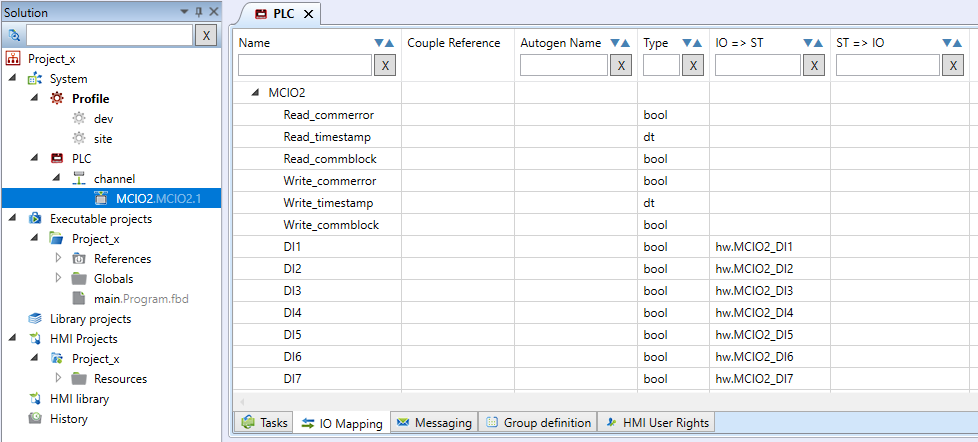
When setting up hardware in your PLC projects, creating datapoints is only half the battle. To actually use those inputs and outputs in your control logic (like FUPLA ladders or Structured Text), you need to map them to global variables. Doing this manually for dozens or hundreds of I/O points is tedious, repetitive, and prone to typos.
That is where the Autogen (Automatic Generation) feature comes in to save the day.
Work Smarter, Not Harder
By simply enabling the Autogen feature (setting Enable SWAutogen = True), Mervis IDE takes over the heavy lifting. Here is what happens behind the scenes during compilation:
- The system automatically creates a global variable for every hardware point.
- It instantly maps your physical input and output data points directly to those newly created variables.
- As seen in the IO Mapping tab, variables are neatly assigned (for example, mapping directly to
hw.MCIO2_DI1) without you typing a single line.
Clean and Organized Code
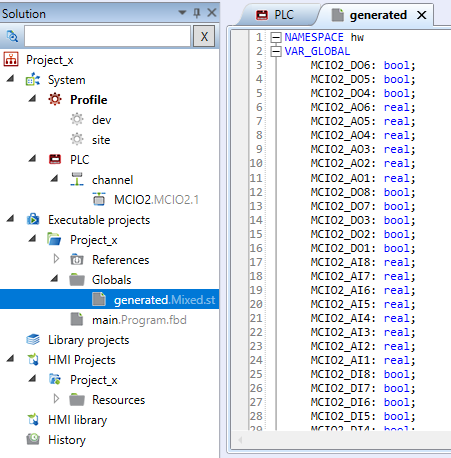
Once compiled, all of these automatically generated variables are neatly organized into a generated Structured Text file (often under a namespace like hw). You can open this generated file in your Solution Globals to see the complete list of boolean and real variables ready for use in your main program.
Stop wasting time on manual data entry! Check out the full guide on configuring Autogen in the Mervis Knowledge Base.