
Make Time Look Good: Showcasing Mervis HMI DateTime Gadgets
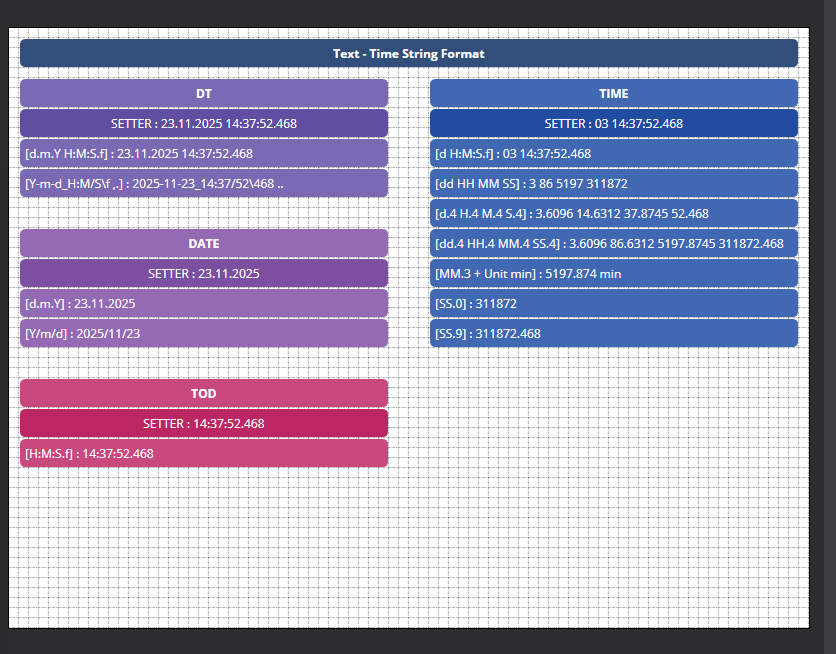
Building a great-looking operator panel shouldn't require fighting with clunky text formatting. That is why we designed the Mervis HMI editor to make handling time and date variables incredibly smooth. The DateTime Indicator and DateTime Setter gadgets give you total control over how time values look—and behave—on your screen.
Why These Gadgets Make HMI Design a Breeze
We built these tools to handle the heavy lifting of UI formatting so you can focus on the bigger picture. Here is a quick look at what they can do:
- Ultimate Format Flexibility: Whether your project uses DATE, DT (Date and Time), TOD (Time of Day), or TIME variables, you can format the output exactly how you want using simple tokens.
- Custom Precision: Want to track a machine's run time? You can display total overall days, hours, minutes, or seconds, complete with custom decimal places (like using
MM.1for minutes with a single decimal). - Smart Automated Spacing: Say goodbye to squished text like "Time Duration2.5min". By enabling the Automated Spaces property, the system automatically inserts clean breaks between your custom text, the formatted number, and your appended physical unit.
- Two-Way Interaction: Use the Indicator gadget to simply display the current PLC time, or drop in a Setter gadget to let operators actively modify date and time values right from the panel.
Want to see all the available formatting tokens and properties? Check out the full breakdown in our Knowledge Base.