
Mastering the HMI Editor in Mervis IDE
An intuitive Human-Machine Interface (HMI) is crucial for effective control systems. The integrated HMI Editor in Mervis IDE serves as your primary tool for defining the interface between your PLC's control logic and the end-user, streamlining everything from local controller text menus to full-scale graphical dashboards.
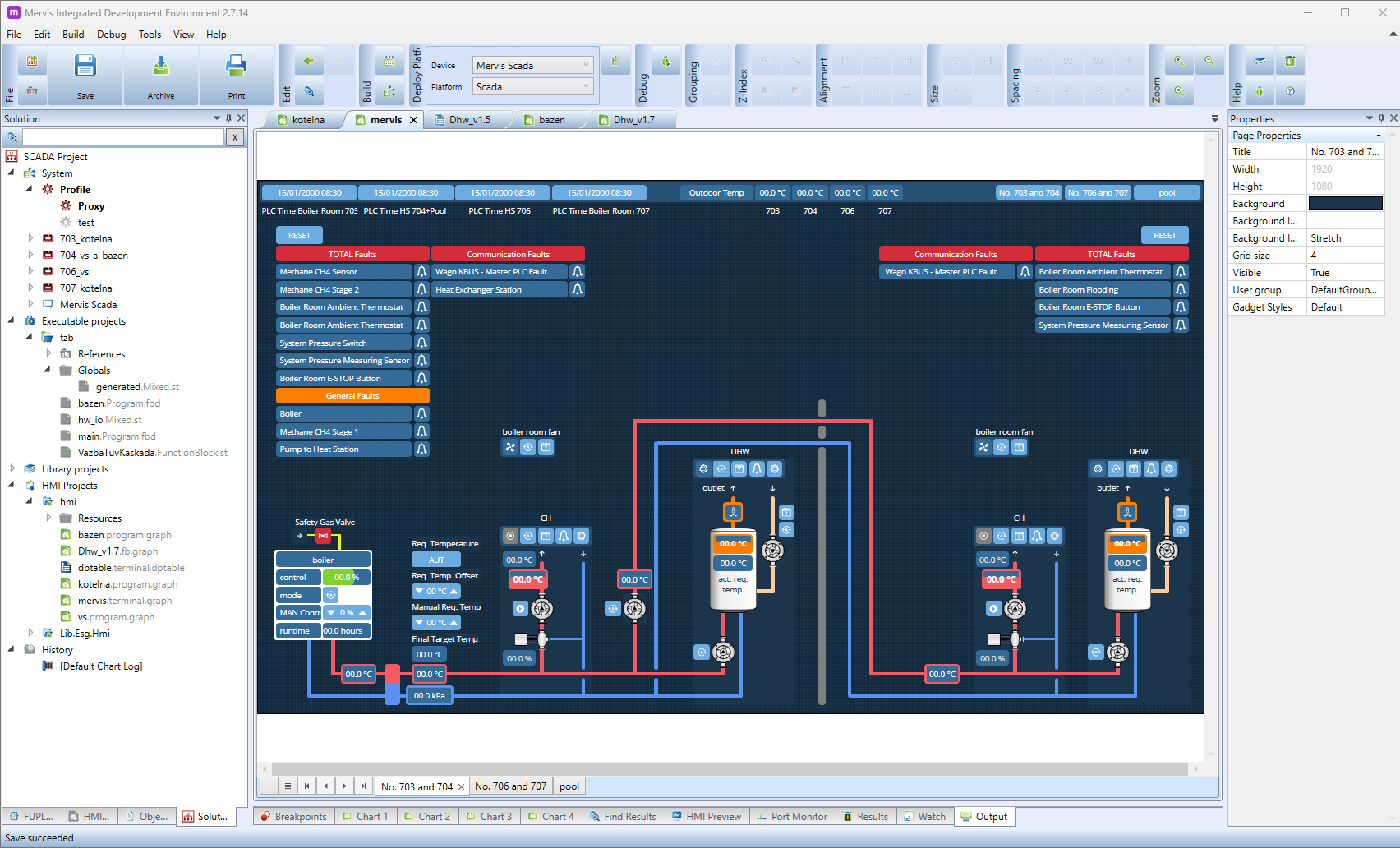 Click the image above to view it in full resolution and read the panel text clearly.
Understanding the HMI Workspace
The IDE layout is optimized for rapid visual design and hardware configuration, split into four key areas:
- Solution Explorer (Left Panel): Organizes your HMI projects, graphical templates, and visual assets right alongside your executable PLC control logic.
- Design Canvas (Center): The visual workbench where you map out systems using pipes, pumps, dynamic readings, buttons, and active alarm states.
- Properties Window (Right Panel): A context-sensitive panel used to adjust elements, such as scaling your page background to standard FHD (1920x1080) resolutions.
- Bottom Panels: Houses active debugging utilities and the HMI Preview tab to test your layout workflows before deployment.
Unique Feature: Direct Mervis SCADA Generation
A truly unique advantage of developing within the Mervis ecosystem is the tight integration between local control and high-level supervision. You can directly create your Mervis SCADA project—including all communication data points and graphical schemas—straight from the IDE environment. This eliminates the need to manually export, reimport, or re-map tag lists between separate software suites, significantly reducing commissioning time and engineering errors.
Integrating Custom Graphics
Enhance your templates by importing assets like the free Mervis Symbols using two primary implementation methods:
- Static Images: Use the standard Image object for background elements or static symbols, defining the local file path in the Properties window.
- Dynamic State Mapping: Use the States feature to bind live PLC variables to graphics, allowing components (like a pump) to swap images automatically based on an ON/OFF state.
Helpful Links & Resources
- HMI Editor Guide: Mervis Knowledge Base: HMI Editor Overview